 Save Assignments |
 Submit Assignments |
 Essay Extensions |
 Find Readings |
 Download Course Guides |
 Make an Appointment |
Showing posts with label How To. Show all posts
Showing posts with label How To. Show all posts
Tuesday, August 14, 2018
How To


Friday, January 13, 2017
Make an Appointment
- Go to www.a3prof.blogspot.com
- Click Contact & Appt Tab
- Look at appointment availability
- Fill out form for appointment
- Appointment created in calendar.
- Not set until confirmed by me.
Wednesday, May 25, 2016
How to Download Course Guides
(Class handouts. Necessary!)
- Go to www.a3prof.blogspot.com.
- Click on Documents
- Scroll for online & print versions
- Click the version for your class.
- Print it and keep it for class!
How to Find Class Readings
- Go to www.a3prof.blogspot.com
- Click class (Eng 102, Myth, etc.)
- Scroll down for Calendar.
- Click day to see readings.
- Copy & paste URL into browser.
- also in syllabus calendar.
How To Definitions
Monday, May 23, 2016
How To Response Label
Response Label
Response labels are handed out randomly during class. You MUST be in class to receive the Response label. If you are tardy or leave class early when the label is handed out, you cannot receive one.

How to Blog Registration, Grades, & Extensions
Blog Registration, Extensions, & Grades
- Go to http://www.a3prof.blogspot.com.
- Click on the Tools Tab.
- Find your class time.
- Click the appropriate link.
- Fill out the form and submit.
- Grades: PIN is from registration email.
- You will receive an email.
- Registration: SAVE THIS EMAIL! Contains ID#, Handle, and PIN#
- Grades: Updated after essay assignments.
- Or use Grade Calculator to estimate your own grade
- Extensions: The email will confirm your new due date.
How to Find Assignments
Responses
(due at class start time!)
- Go towww.a3prof.blogspot.com
- Twitter feed on right side of blog.
- Can also click Updates icon.
- Look for your course # (+handle)
- Eng 102 or Eng 102 Ray
- Get tweets as text messages!
- Send “follow A3Prof” to 40404
Essay Assignments
All essays assigned at start of semester
- Click on your class ie: Eng 102
- Click on Essay Assignments
- Due dates listed in class calendar
Sunday, May 22, 2016
How to Save Assignments
Use Assignment Templates!
Click here for How to use templates


Click here for How to use templates
- Click save (as) icon in Word.
- Microsoft Office 365 is free for all MCC students.
- Export in some programs
- Select folder to save in.
- Type in correct filename.
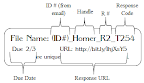
- Begins with (ID#) (Handle)
- ie: 115 Ray
- Always use1 space
- Never use parentheses ( )
- Look at examples below.


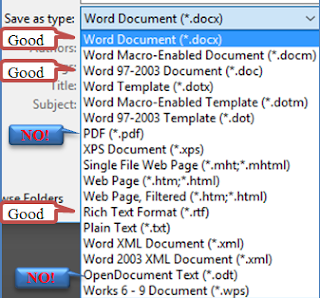
- Select correct file type
- Click Save as type drop down
- .doc, .docx, or .rtf files
- NOT .pages, .odt, or .pdf

- Click Save
How to Submit Assignments
STOP! Review Assignment first!
Assignments with incorrect format, filename, or type will not be graded!
Make sure to use assignment templates!

All assignments must be sent by email.
- Compose email to: Andrew.Adams@mesacc.edu
- Email Subject = Fedora
- Attach file to email
- DO NOT Insert Google Drive (or Microsoft One Drive) files
- DO NOT Insert Link
- Send email

Thursday, March 1, 1990
How To




Subscribe to:
Posts (Atom)